Super Billing 2.0 · new AI Assistant · works without internet

Offline, lifetime
billing software
for small business.

Super Billing installs on your shop PC and makes GST bills with or without internet. Pay once and the licence is yours for life, with every update free. New in 2.0: say an order in your language and the AI Assistant makes the bill.

Super Billing Offline · saving on this PC
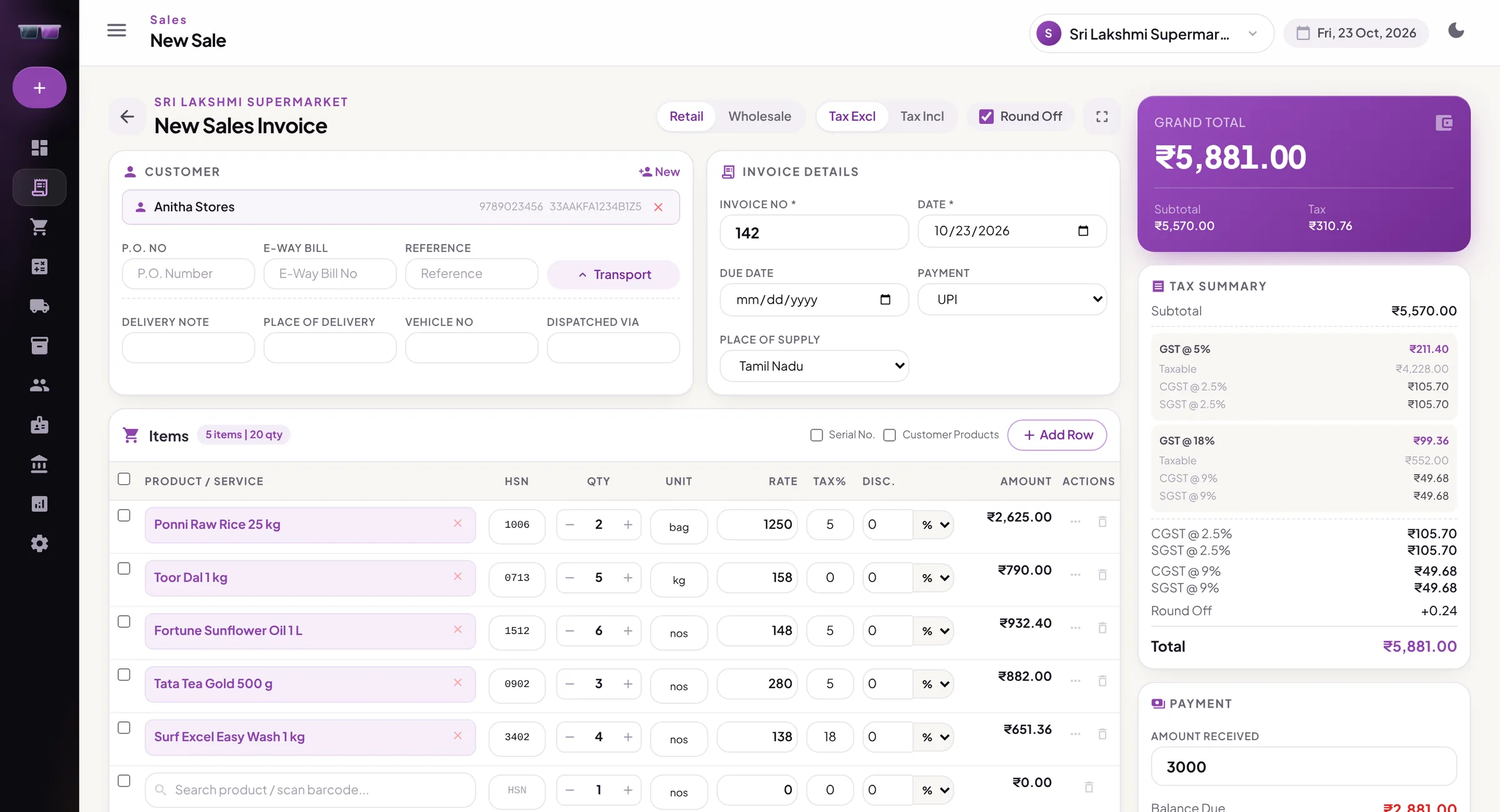
The New Sales Invoice screen in Super Billing 2.0: five grocery items for Anitha Stores, CGST and SGST worked out by slab, a grand total of ₹5,881 and ₹3,000 received by UPI
✓
Bill savedno internet needed
⎙
Printed at once80 mm thermal, no print box
↻
Version 2.0 installedupdates are free for life

Built for busy counters

Why offline

Your counter keeps billing. Whatever the internet does.

Most billing apps stop when the shop's connection drops. Super Billing lives on your PC, so the queue at the counter never waits for a signal.

Bills without internet

Every bill, payment and stock change saves on the shop PC the moment you press Save. When the line drops, nobody at the counter notices.

Internet: offBilling: on
BillTimeTotalStatus
INV-104011:02₹860Saved
INV-104111:05₹2,415Saved
INV-104211:09₹3,046Saved

Pay once. It's yours.

No yearly renewal. The licence never expires, and every new version is free.

One paymentFree updates for life

Prints the moment you save

Pick the counter printer once. Every bill goes straight to it, with no print box to click through.

80 mm thermal58 mm thermalA4PDF

More counters, one set of books

Counter PCs join the main PC over the shop Wi-Fi or cable. Stock and dues match at every counter.

  • MMain PCKeeps the books
  • 1Counter 1Connected
  • 2Counter 2Connected

Your data stays in your shop

Bills and accounts live on your own PC. Add the cloud backup and the copy is locked with a key only you have. We can't read it.

  • Last backup2 minutes ago
    Safe
  • Encrypted withyour recovery key
    Only you

Your shop on your phone

With the backup add-on, pair your Android phone and see today's sales, stock and dues from home.

Mon
Tue
Wed
Today

GST returns, ready to upload

Every bill's tax is split into CGST, SGST and IGST by slab. Download the GSTR-1 and GSTR-3B files, or send them to your accountant.

↓ GSTR-1 JSON↓ GSTR-3B JSONE-way bill no. on invoice

New in 2.0 · AI Assistant

Say the order. The bill makes itself.

Speak or type the way you talk to your staff, in Tamil, Hindi, Telugu, Kannada, Malayalam or English. The AI Assistant finds your customer and your products, prices the bill, and shows it to you. You check it, then save.

  • Bills by voice"Two kilo toor dal, five kilo sugar, one bag rice, cash." It knows your products by the names your customers use.
  • New customers with their ratesSay the customer's name, phone and rates, or "the wholesale price list, 2% less". It sets them up in one go.
  • Any Excel or CSV fileDrop in a list from Tally, Vyapar or a hand-made sheet. It reads the columns and imports customers, products and rates.

Needs internet. Included with Silver, Gold and the online app. Your normal billing still works without it.

✦AI Assistant

Bill for
Matched
    Grand total
    EditSave & Print

    Top features

    Everything your counter needs, in one app

    The six things shop owners use every day. These are real screens from Super Billing 2.0.

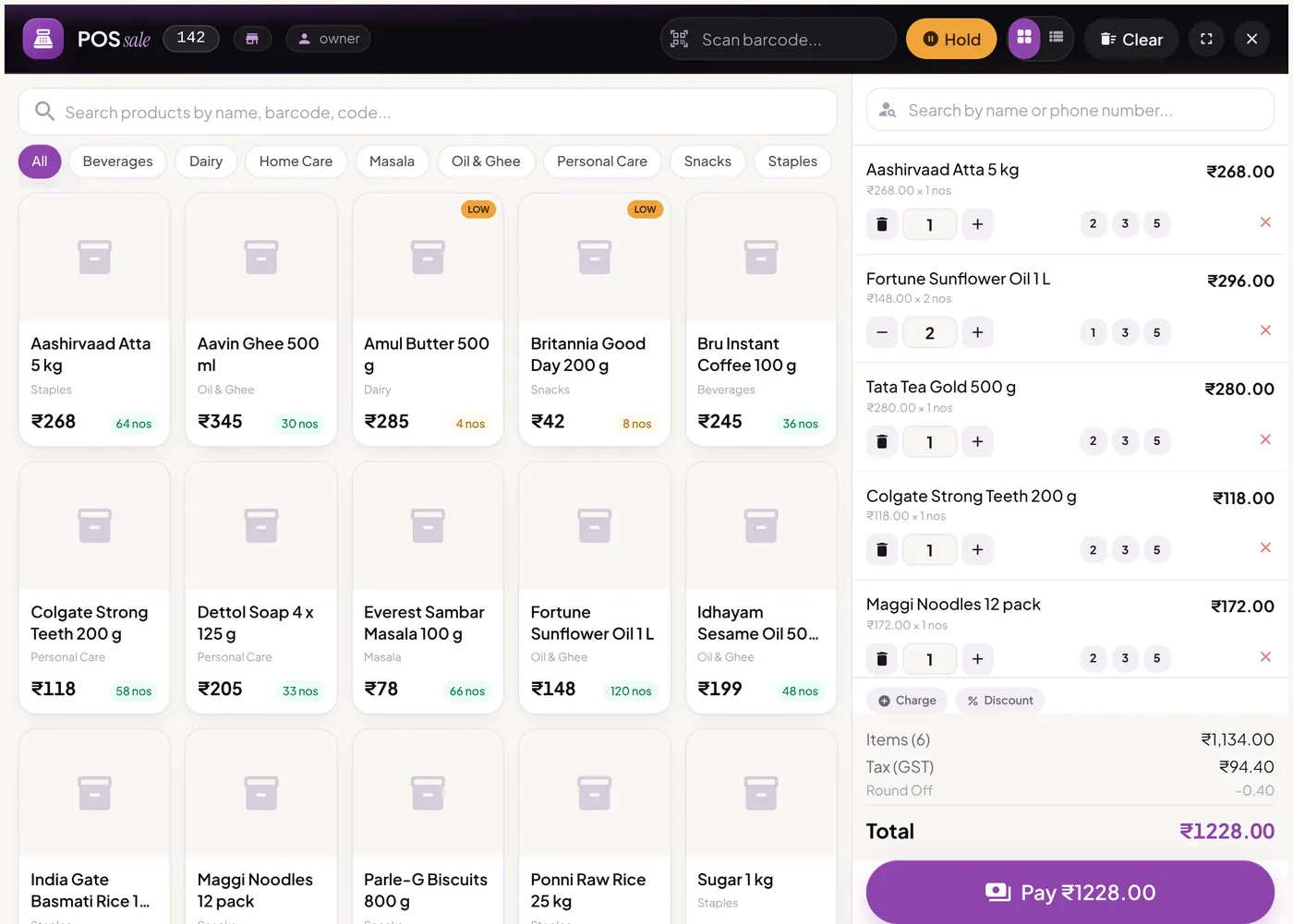
    POS billing

    Bill a customer in seconds

    Scan a barcode or tap an item, take cash, UPI or card, and print on the counter's printer. Hold a bill while the next customer pays.

    • Barcode scanning
    • Hold & resume bills
    • Thermal or A4 print
    POS screen with a product grid by category and a cart of five items totalling ₹1,228
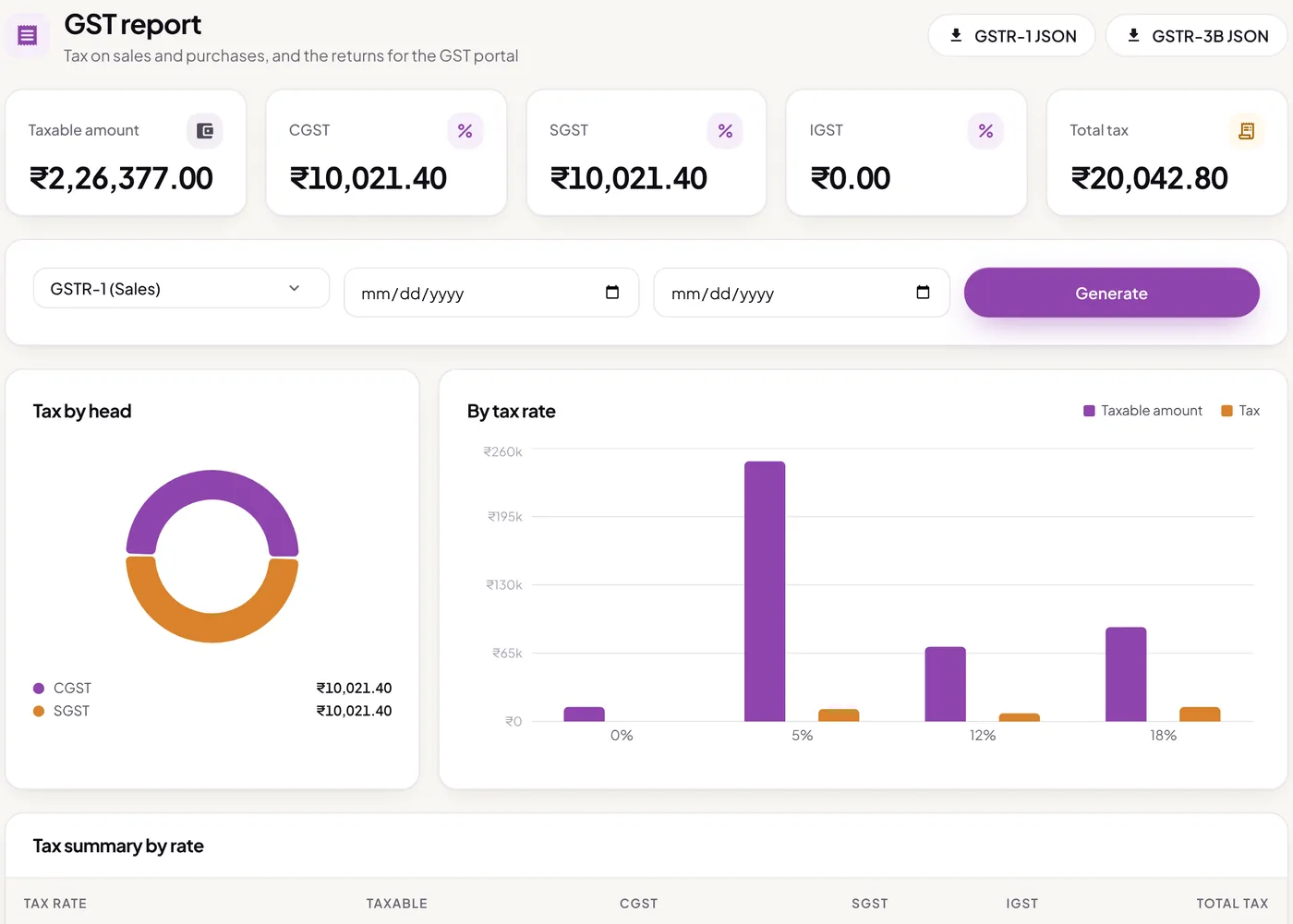
    GST

    GST bills and returns, done for you

    CGST, SGST and IGST are worked out on every bill. Download the GSTR-1 and GSTR-3B files for the GST portal, and make e-way bills without internet.

    • Tax split by slab
    • GSTR-1 & GSTR-3B files
    • Composition scheme
    GST report with taxable amount, CGST, SGST and total tax for the month, and charts by tax head and tax rate
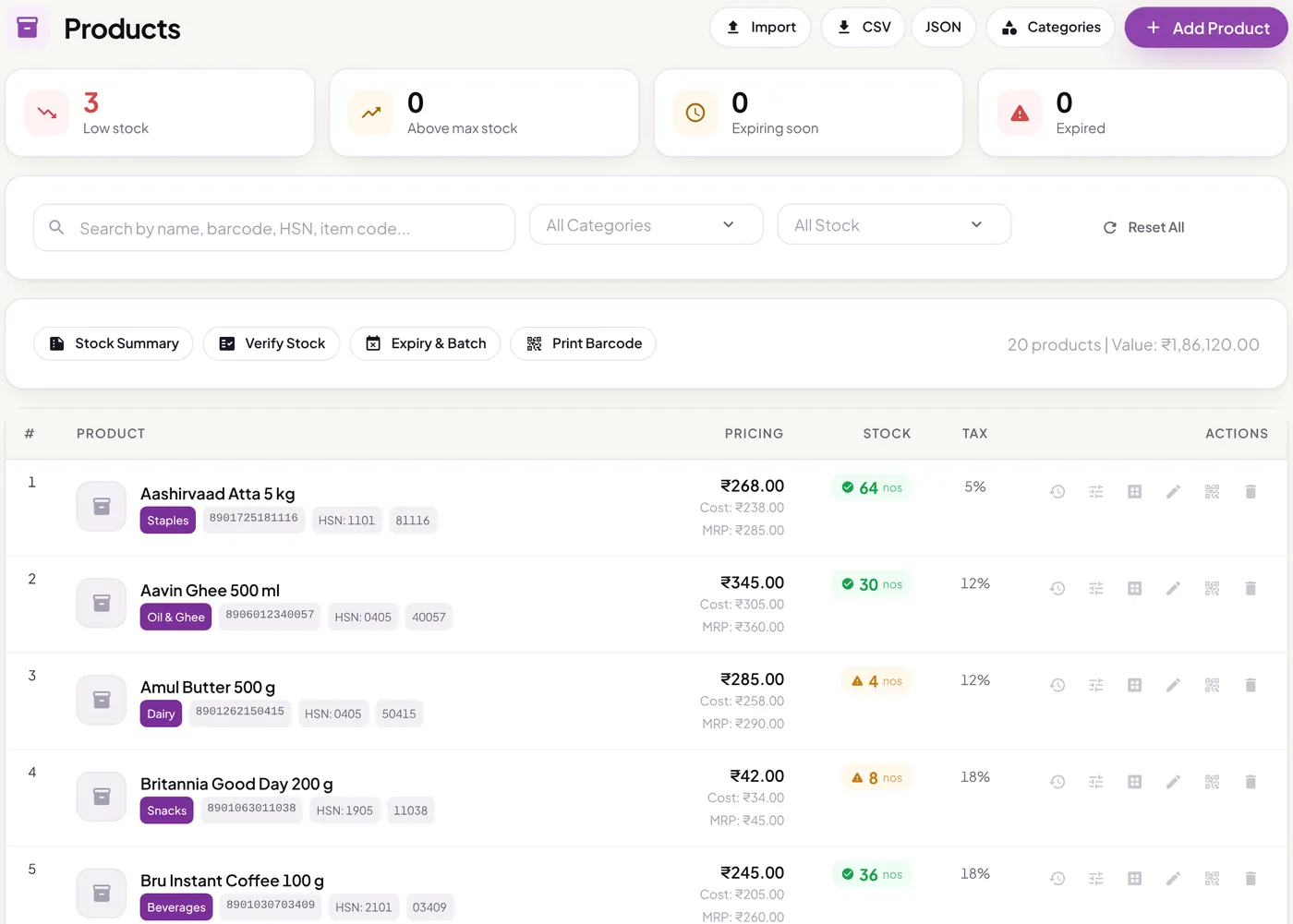
    Stock

    Stock that keeps itself

    Every sale and purchase updates stock on its own. See what's running low, track batch and expiry, and print barcode labels for your own packets.

    • Low-stock alerts
    • Batch & expiry
    • Barcode labels
    Products list with prices, HSN codes, barcodes, stock levels and low-stock warnings
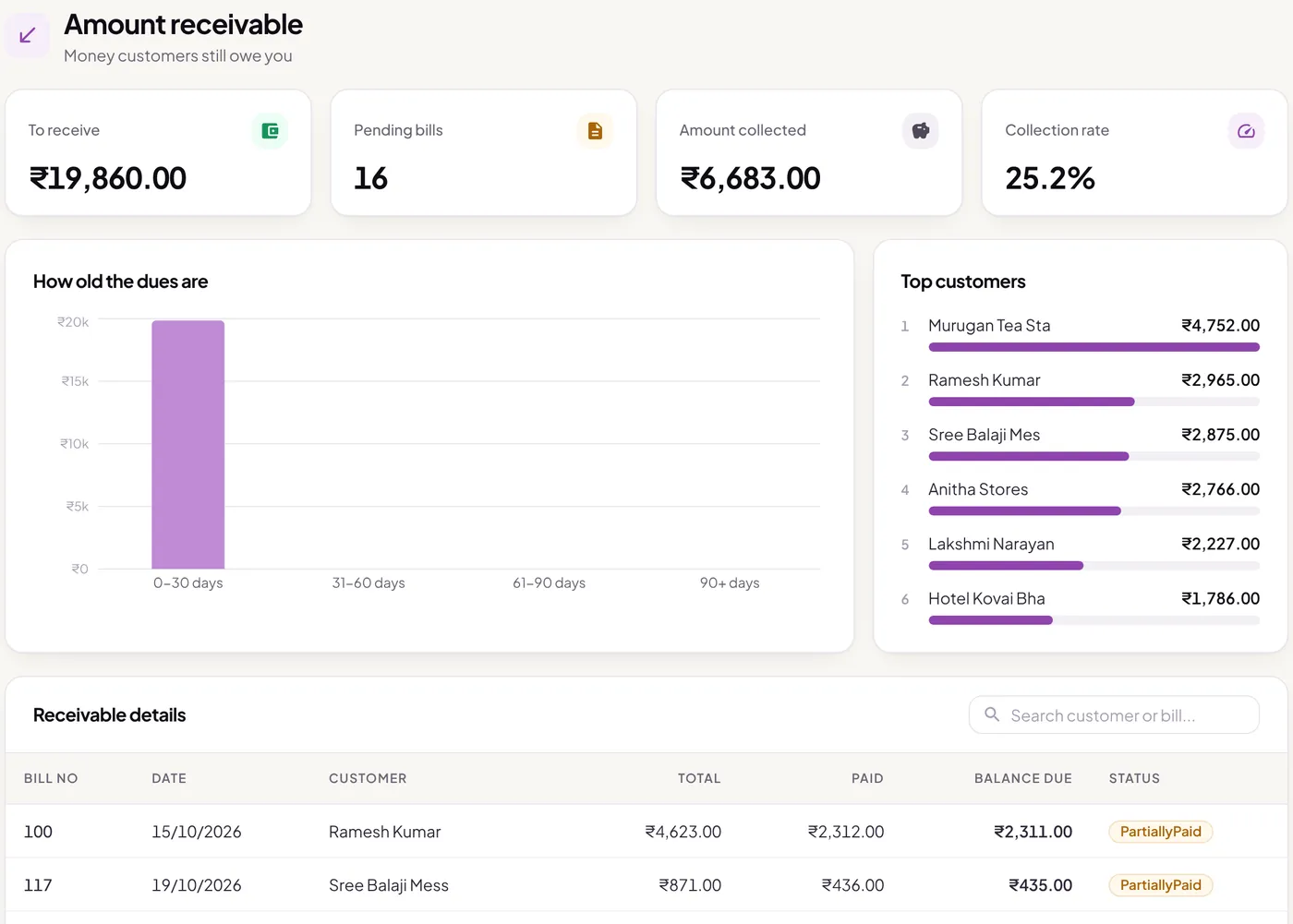
    Dues

    Know who owes you, and since when

    Credit bills go to the customer's account by themselves. See your dues by age, your top customers by balance, and record part payments as they come in.

    • Customer khata
    • Dues by age
    • Supplier dues too
    Amount receivable report with the total to receive, a chart of dues by age and the customers who owe the most
    Reports

    Profit and loss without an accountant

    Sales, purchase, stock and GST reports, profit & loss and the balance sheet, all worked out from the bills you already make.

    • Profit & loss
    • Balance sheet
    • Day book & ledger
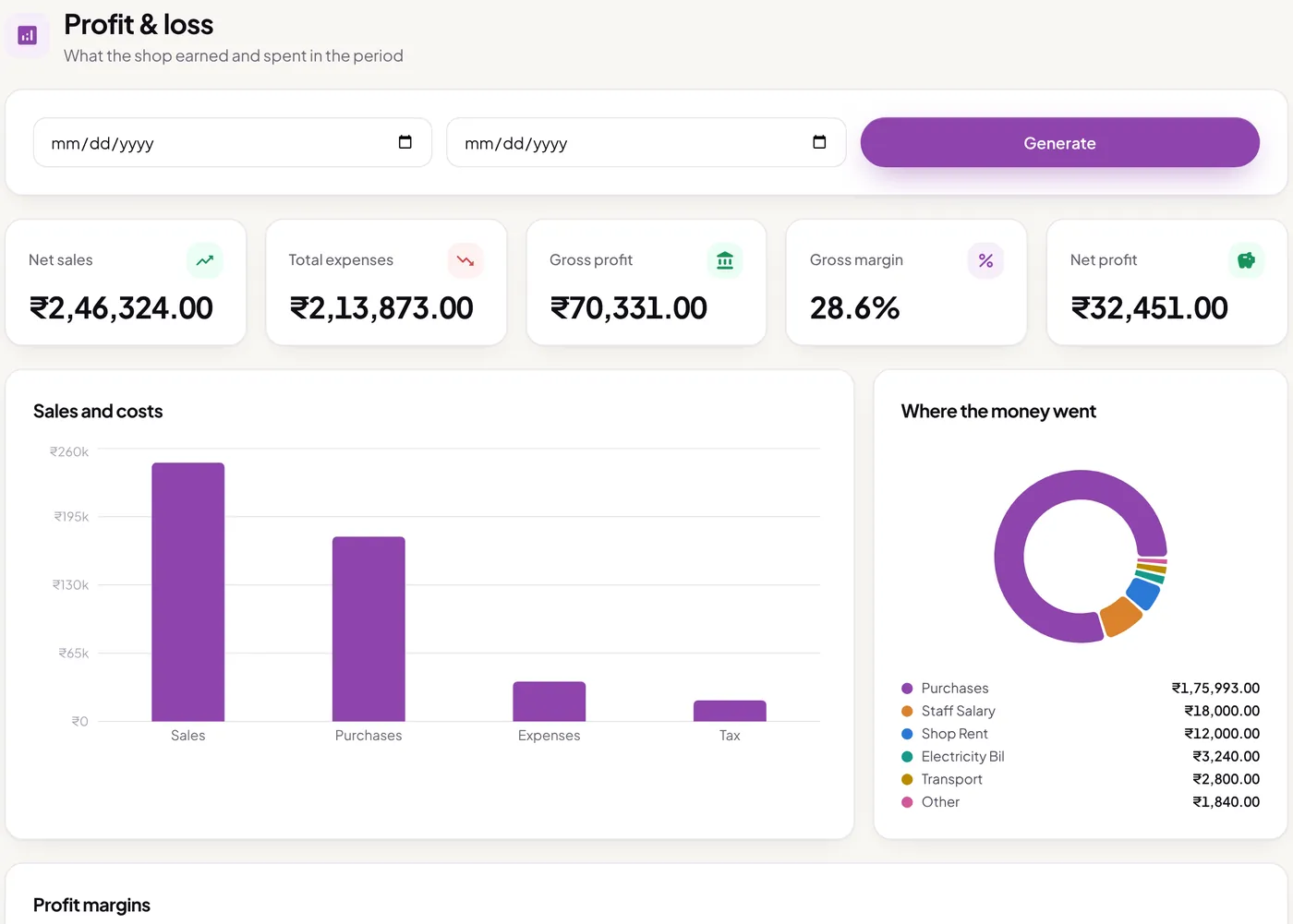
    Profit and loss report with net sales, expenses, gross profit, margin and net profit, and where the money went
    Invoices

    Bills that look like your shop

    Tax invoice, bill of supply and non-GST designs for A4, A5 and thermal paper, with your logo, bank details and colours. Save as PDF or share on WhatsApp.

    • Ready-made designs
    • Template builder
    • PDF & WhatsApp
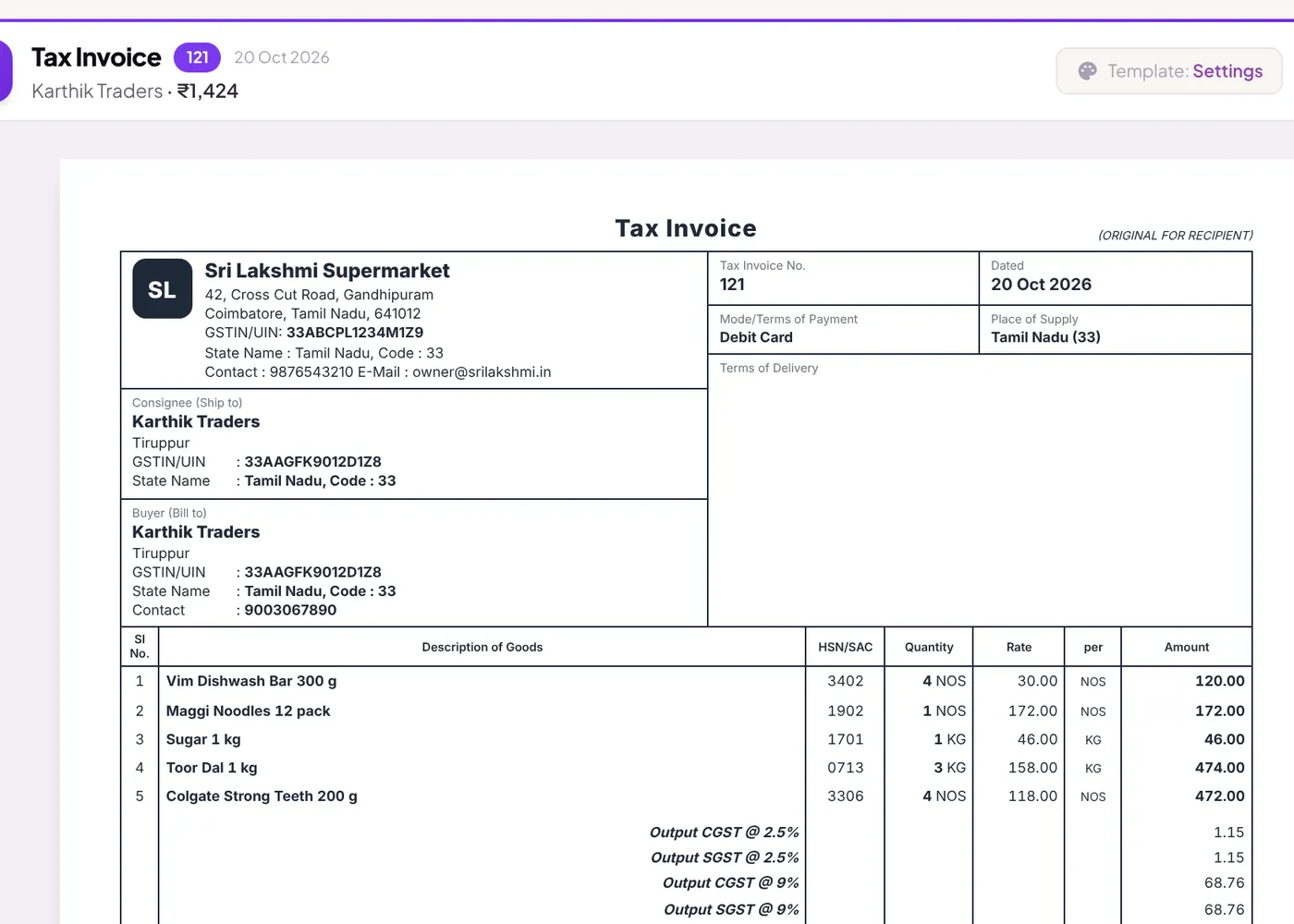
    A printed GST tax invoice from Sri Lakshmi Supermarket with the buyer's GSTIN, HSN codes and tax summary
    See all features → Purchases, returns, estimates, price lists, staff logins, expenses, backups and more.

    How it works

    Watch one bill do four jobs

    Most shops write the same sale in a bill book, a stock register, a credit notebook and an Excel sheet for the accountant. Here's what happens instead.

    InvoiceINV-1042 · Ravi Traders
      Subtotal₹0.00
      GST₹0.00
      Grand total₹0
      Received by UPI₹2,000
      1Stock register
        2Customer account
        Ravi Traders owes you₹0
        3GST return · October
        CGST₹0.00
        SGST₹0.00
        Ready forGSTR-1
        4The bill itself

        For your shop

        Made for the way your counter works

        One app for every shop that gives a GST bill, set up for the four kinds of business we know best.

        Pay once

        Your billing software, paid off in year one

        A shop with one billing computer, on the Silver plan.

        Pricing

        Start free. Pay once when you grow.

        Runs on Windows 10 and 11. Download, install and make your first bill in minutes. No card needed.

        Free

        Try it in your shop

        ₹0forever

        No card needed

        Download free
        • GST bills, POS & barcode
        • Stock, customers & dues
        • Sales & stock reports
        • Thermal & A4 printing
        • Ready-made bill designs
        Most shops

        Silver

        One shop, one company

        ₹999once

        Lifetime licence · 1 PC

        Buy Silver
        • Everything in Free, no limits
        • AI Assistant: bills by voice
        • GSTR-1 & GSTR-3B reports
        • Profit & loss, balance sheet
        • Template builder & custom fields
        • Your brand only on bills

        Gold

        More than one business

        ₹3,299once

        Lifetime licence · 1 PC

        Buy Gold
        • Everything in Silver
        • Unlimited companies
        • Own GSTIN, stock & books for each
        • Switch company in one click
        • GST reports for each company
        Plan details Free ₹0 forever Silver ₹999 once Gold ₹3,299 once
        Plan details
        Billing PCs11+₹2,999 per extra counter1+₹2,999 per extra counter
        Companies11Unlimited
        Products100UnlimitedUnlimited
        Bills50 a monthUnlimitedUnlimited
        AI Assistantbills, customers & imports by voice or text; needs internet
        Works without internet
        App updatesFree for lifeFree for lifeFree for life
        SupportAdd-on₹1,499 a yearAdd-on₹1,499 a yearAdd-on₹1,499 a year
        "Made with Super Billing" line on billsYesNoNo

        Add-ons, only if you want them

        Add them to any plan, when you need them. Your billing never depends on them.

        ₹1,499/year

        Support

        Phone and WhatsApp help with setup, printers and GST questions. No plan includes it, so add it when you want it.

        Add support
        ₹2,999/PC, once

        Extra counter

        Add a billing counter to Silver or Gold. It joins the main PC over the shop Wi-Fi or cable, prints to its own printer and needs no internet.

        Add a counter
        ₹499/year

        Cloud backup + phone app

        An encrypted copy of your shop in the cloud, a restore onto any new PC, and the Android app to see sales, stock and dues from home.

        Add backup
        from ₹999/year

        Online app

        Super Billing in the browser at app.superbilling.in. Bill from your laptop at home or from a second shop, on any device.

        See online pricing

        Getting started

        Billing on it before lunch

        1. 01

          Download and install

          One installer for Windows 10 or 11. Make your free account with your email and mobile, which needs internet just this once, and you're on the Free plan.

        2. 02

          Add your products

          Drop your Excel or CSV list into the AI Assistant and it works out the columns, or add items as you bill them.

        3. 03

          Make your first bill

          Print it, and watch stock and accounts fill in by themselves. Upgrade only when you need more.

        FAQ

        Before you download

        The questions shop owners ask us most.

        Yes. Install Super Billing on one PC, make your free account (it needs internet just once, to confirm your email), and use it for as long as you like: up to 100 products and 50 bills a month, with every update free. No card and no time limit. Bills on the Free plan carry a small "Made with Super Billing" line at the bottom.
        Silver is for one business. Choose Gold if you run more than one business from the same PC, each with its own GSTIN, stock and books. Both are pay once for one PC, and you can add counter PCs to either for ₹2,999 each.
        Super Billing asks you to upgrade before the 51st bill. The count starts again on the 1st of every month. Your bills, stock and customers stay exactly as they are, and buying a licence unlocks everything on the same PC at once.
        Tap the AI Assistant, choose your language (Tamil, Hindi, Telugu, Kannada, Malayalam or English) and say the order, or type or paste it, like a WhatsApp message. It finds the customer and the products, uses that customer's rates and shows you the bill. Nothing is saved until you check it. It can also add a new customer with their rates, or import an Excel or CSV file. It needs internet and comes with Silver, Gold and the online app.
        No. Every update is free for life, on every plan, Free included. Version 2.0 and everything after it.
        Phone and WhatsApp help with setup, printers, imports and GST questions. Support is an add-on on every plan, ₹1,499 a year, so you pay for it only if you want it. The app keeps working and updating either way.
        Nothing changes at the counter. Bills, payments and stock save on the shop PC. The internet is only needed once to make your free account or activate your licence, then for updates, cloud backup and the AI Assistant. Updates and backups wait until you're back online, and you can always bill by hand.
        With the cloud backup add-on, install Super Billing on the new PC and restore your shop with your licence key and recovery key. Without it, take a backup to a pen drive from Settings → Backup, and restore that on the new PC.
        Yes. The cloud backup add-on includes the Android app, which shows sales, stock and dues from anywhere. To make bills from home or a second location, add the online app.
        Open the download page on your phone and tap Download the Android app. Open the downloaded file and tap Install. The first time, Android asks you to allow installing apps from your browser: tap Settings, turn on "Allow from this source" and go back. When a new version is out, the app shows an Update button.
        Yes. Export your items, customers or rates from your current software as an Excel or CSV file and give it to the AI Assistant. It reads the columns, matches names to what you already have and shows you everything before it imports. Your past years can stay in your old software.
        Any PC with Windows 10 or 11. For counters, each counter PC needs to be on the same shop Wi-Fi or cable network as the main PC.
        Yes. Windows shows this for new apps it doesn't know yet. Click More info, then Run anyway, and the installer starts. You only see it once: after that Super Billing updates itself when you close it.

        Make your next bill on Super Billing 2.0

        Offline, lifetime billing software for small business. Free forever, or pay once when you grow.

        Download free →